If your social tool doesn’t send lead, campaign, and reporting data into the rest of your stack, you’re leaving time and revenue on the table. For me, after testing 50+ social tools every week for 2+ years at TopSocialTools.com, the pattern is dead simple: the teams that win in 2026 don’t just schedule posts - they connect social to CRM, analytics, email, and task tools so data moves without copy-paste work.
Here’s the short version if you want the answer fast:
- Audit your stack first using a social media automation checklist to find manual handoffs
- Pick one clear goal, like sending Instagram leads into HubSpot
- Start with the easiest setup path: native integration, then Zapier/Make, then API if you need custom logic
- Build money-path workflows first: social → CRM → follow-up
- Lock naming rules for UTMs and campaign fields before launch
- Test field mapping, app permissions, and post-sync checks so reporting doesn’t quietly break
I’ve seen teams waste hours every week moving the same lead data between dashboards, spreadsheets, and CRMs. I’ve also seen one clean workflow cut follow-up time from next day to under 5 minutes. That’s the difference between social being noisy activity and social feeding pipeline.
Quick comparison
| Integration method | Setup time | Flexibility | Best use |
|---|---|---|---|
| Native integration | Minutes | Low | Basic CRM or analytics sync |
| Zapier / Make | Hours | Medium | Multi-step AI automation workflows across apps |
| API / custom build | Days to weeks | High | High-volume or custom field routing |
Ever wonder where most teams mess this up? For me, it’s not the tool choice. It’s bad naming, weak field mapping, and trying to automate everything at once. One clean workflow beats five messy ones every time. That’s the bottom line I keep seeing.
sbb-itb-b3cfc51
Understanding the Benefits of an Integrated Marketing Stack
I’ve seen this over and over testing social tools and alternatives every week at TopSocialTools.com: the stack usually isn’t the problem. The disconnect between tools is. Once your social platform, CRM, and analytics setup start talking to each other, social stops being a pile of scattered activity and starts becoming something you can actually use.
For me, the three gains that matter most are cleaner data, faster handoffs, and clearer attribution. That’s what actually moves the needle when you’re trying to make sense of viral chaos without drowning in tabs.
Better data sync and clearer insights
Here’s what I noticed: social data gets way more useful the second it leaves its little silo. When engagement data flows into a CRM like HubSpot, it starts building real customer records instead of sitting off on its own in a separate dashboard. Suddenly, a lead’s social activity, form fill, and later sales touchpoints show up as one connected story instead of three random signals.
I ran into this with a creator-focused tool stack not long ago. Social engagement looked strong inside the SMM dashboard, but the team still couldn’t tell which people turned into pipeline. Once they pushed that data into HubSpot, the picture changed fast. The win wasn’t more data. It was cleaner context.
The same idea applies to analytics. If your SMM tool sends structured campaign data into your analytics setup, you can track which posts drove conversions instead of just racking up clicks and patting yourself on the back. Clicks look nice. Conversion data tells the truth. That’s the kind of attribution that makes reports useful instead of decorative.
Faster workflows through automation
This is the part most teams feel first. The biggest time drain usually isn’t content creation or reporting. It’s the boring in-between work: copying a new social lead into a CRM, setting a follow-up task, updating campaign status, then realizing someone missed a field along the way.
Automation handles those handoffs in seconds. That means less manual cleanup, fewer dropped leads, and way less back-and-forth between teams. I’ve seen setups where one simple workflow pushed a lead from a social form into the CRM, assigned the owner, and kicked off a follow-up sequence right away. No spreadsheet detour. No “I thought you had it” Slack message.
Standardized fields matter here too. If data moves between systems in a consistent format, your team spends less time fixing broken records and more time acting on them. The real difference-maker isn’t just speed. It’s reducing all those tiny mistakes that pile up when humans keep re-entering the same info.
Clearer customer journey mapping
Without integration, the customer journey feels chopped up. You see a like here, a site visit there, maybe a sales note later, but none of it connects. That makes attribution fuzzy and turns reporting into guesswork.
With integration in place, you can trace the path from a social interaction to later engagement and eventually to a sales conversation. That gives every team a sharper view of what’s working. Marketing can see which campaigns pushed people forward. Sales can understand what warmed the lead up before the call. And leadership gets a clearer read on where revenue is actually coming from.
I’ve seen this matter a lot for marketers running multi-platform campaigns. A post on LinkedIn might not look flashy on its own, but when it shows up as the first touch before a demo request and later deal activity, it earns its spot fast. That’s when social reporting stops being vanity-metric theater and starts connecting to pipeline.
With the benefits clear, the next step is auditing the tools and data you already use.
Step 1: Assess Your Current Marketing Stack and Needs
Before you connect anything, take stock of what’s already in place. In my testing, teams usually don’t need more tools at this stage - they need a clean read on the tools they already have and where the messy handoffs live. That’s usually where the first automation win shows up.
Identify the Core Tools in Your Ecosystem
Start by listing every tool that touches marketing data: your SMM platform, CRM (HubSpot or Salesforce), email marketing tool, Google Analytics, Meta Business Suite, Asana, and any paid ad platforms. For each one, note who owns it, what data it stores, and how it passes data to other tools.
Here’s what I noticed after testing 50+ social tools week after week: the stack almost always looks fine on the surface, but there’s usually one hidden mess behind it. Maybe social leads land in a form tool, then someone dumps them into a spreadsheet, then a marketer updates HubSpot by hand. That kind of workflow works - until it doesn’t.
A simple way to look at it is this: find your core hubs. Those are the tools everything else leans on. In most setups, that’s the CRM or your main analytics platform. If HubSpot holds lead records and campaign notes, that’s a hub. If Google Analytics is where the team checks traffic and UTM data every day, that’s a hub too.
Also flag every manual handoff, such as copying a lead into a spreadsheet or downloading a CSV to update campaign tags. Those are usually the weakest links, and for me, they’re often the first places worth fixing. I’ve seen creators and lean marketing teams save hours just by removing one CSV shuffle from a weekly reporting loop. If a person has to move the same data twice, that’s usually your clue. The tricky part is being honest about how often that happens.
Set Clear Integration Goals Before You Start
Once you know what you have, pick one or two specific outcomes to work toward first. Vague goals like "better reporting" don’t give you much to build around. Concrete goals do - for example: route LinkedIn automation leads into HubSpot, or sync campaign UTM tags into Google Analytics automatically.
For me, this is where a lot of teams either get momentum or stall out. They try to “connect the stack” all at once, and suddenly the whole thing turns into dashboard sprawl and viral chaos behind the scenes. A tighter goal keeps the work grounded. One creator I worked with didn’t start with some giant cross-platform setup - they just wanted Instagram lead form data to hit the CRM without anyone touching it. That single fix cleaned up follow-up time fast.
Replace one manual step with a repeatable workflow. Fix the highest-friction handoff first, then map it to the right integration method. That becomes your first workflow to build. One clean workflow beats five half-finished automations every time. What I’ve learned is that the first win should feel boring in the best way - simple, steady, and easy to trust.
Step 2: Choose the right integration method for your SMM tool
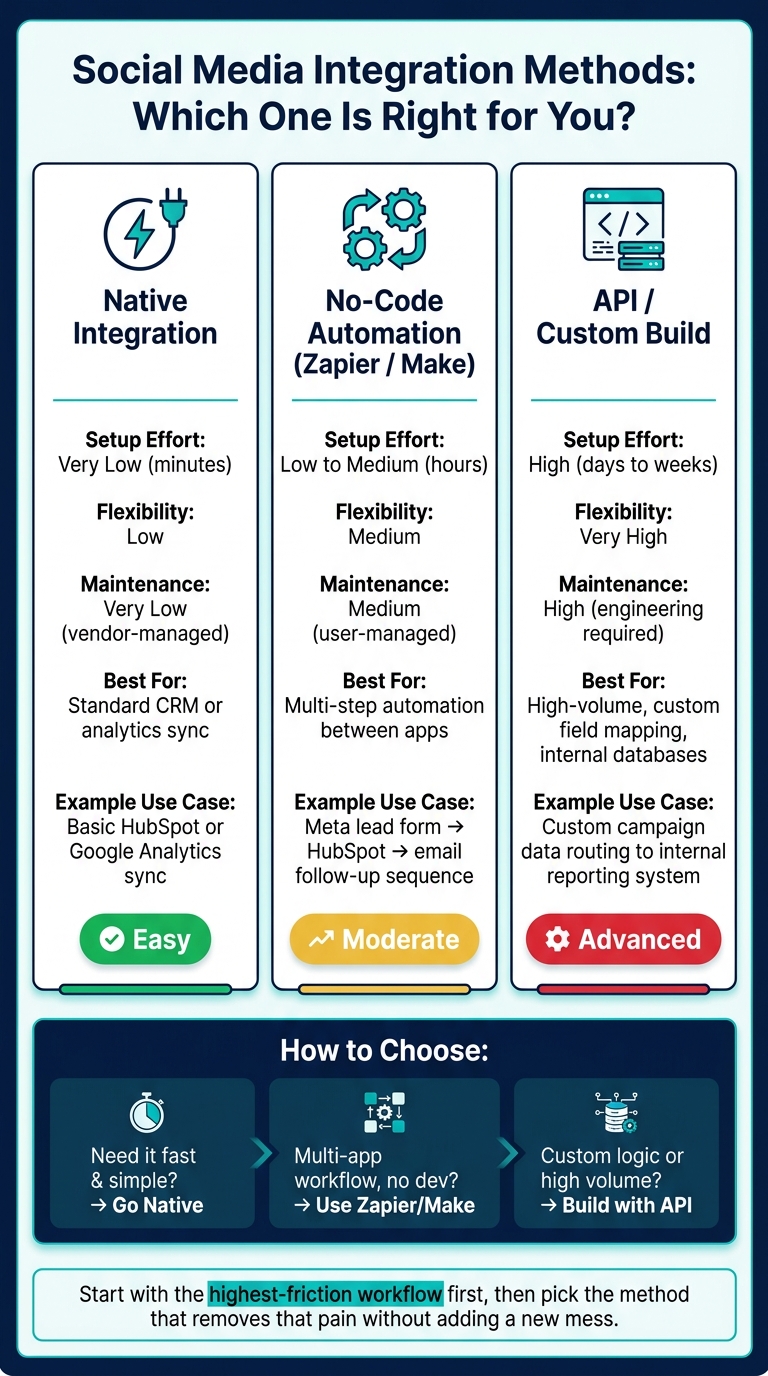
Social Media Integration Methods: Native vs No-Code vs API
For me, this is where a lot of teams either save hours every week or walk straight into setup pain they didn’t need. After testing social tools nonstop at TopSocialTools.com, I’ve learned one thing fast: the right integration method matters more than the tool demo makes you think.
In 2026, you’ve got three main paths: native integrations, no-code automation tools, and custom API integrations. I’d choose based on three things only: speed, flexibility, and how much upkeep your team can handle. What actually moved the needle in my testing was simple - start with the highest-friction workflow from Step 1, then pick the method that removes that pain without adding a new mess.
Use native integrations for faster setup
Native integrations are built right into your SMM tool, and when they exist for the apps you already use, they’re usually the easiest win. If your platform already connects to HubSpot, Salesforce, Google Analytics, or Asana out of the box, that’s usually your fastest path.
I’ve seen this work well for basic CRM syncs and reporting handoffs where the team just wants data to move cleanly with almost no babysitting. A creator-focused agency I looked at recently used a native HubSpot sync to push campaign leads straight from their social tool, and they had it running the same afternoon. That kind of setup speed is hard to beat.
The catch? You’re limited to the fields, triggers, and actions the vendor supports. If you need odd field logic, custom routing, or a weird internal handoff, native starts feeling cramped pretty fast. For me, native integrations make the most sense when you need a simple, low-maintenance sync. The tricky part is knowing when “simple” is enough.
Use Zapier or Make for no-code automation
When the native connector isn’t there - or it exists but doesn’t go far enough - I usually look at Zapier or Make next. This is the middle ground I keep coming back to when a workflow spans several apps and nobody wants to wait on engineering.
One setup I’ve seen a lot is routing a Meta lead form submission into HubSpot and then kicking off a follow-up email sequence. That’s a clean use case for no-code automation because it links tools that don’t always play nicely on their own. In my testing, this is where teams start getting that “okay, now this stack actually works” feeling.
Setup usually takes a few hours, and the upkeep sits with whoever built the workflow. That matters more than people admit. If your best ops person leaves and nobody knows why a Zap fails every third Tuesday, that “easy” automation gets annoying fast. No-code is great for multi-step flows, but it still needs an owner. That’s the bottom line I keep seeing.
Use API integrations for custom data flows
API integrations are the heavy-duty route. I’d use them for high-volume workflows, custom field mapping, internal databases, or anything no connector can handle cleanly. They take days or weeks, and you’ll need engineering support, but sometimes that’s just the cost of doing it right.
This is also the lane for stack-level outcomes like internal reporting, advanced lead routing, or data normalization. I’ve seen teams try to force this stuff through no-code tools, and it usually turns into duct-tape ops. One brand I reviewed had campaign data flowing from its SMM platform into an internal reporting system, and once they switched to a custom API setup, the reporting got way less messy because the fields were mapped exactly how their team needed them.
If you go this route, structure API output as JSON for cleaner field mapping. And if sensitive data is involved, verify SOC 2 Type II and ZDR support. For me, that’s not optional housekeeping - it’s table-stakes if customer or lead data is moving around. What I’ve learned is that API work pays off when the workflow is big enough to justify the effort.
| Integration Method | Setup Effort | Flexibility | Maintenance | Best-Fit Use Case |
|---|---|---|---|---|
| Native | Very low (minutes) | Low | Very low (vendor-managed) | Standard CRM or analytics sync |
| No-Code (Zapier/Make) | Low/medium (hours) | Medium | Medium (user-managed) | Multi-step automation between apps |
| API / Custom | High (days–weeks) | Very high | High (engineering-required) | High-volume, custom field mapping, internal databases |
Once you pick a method, tie it back to the workflows that will save the most time and clean up reporting. That’s where the choice starts paying for itself.
Step 3: Build the most useful social media integration workflows
For me, this is where social integrations stop being a pretty diagram and start doing actual work. I’ve seen teams wire up ten tools, feel productive for a week, and then realize none of it ties back to pipeline or revenue.
Start with the workflows that feed your core systems first. Money-path workflows come before everything else. In my testing, the first setup that tends to move the needle is the one that links social activity to leads, deals, and follow-up.
Connect SMM tools with CRM and email marketing
I’d build this one first every single time. Route social leads from forms, DMs, or high-intent comments straight into HubSpot or Salesforce, because the longer that handoff waits, the messier your data gets.
Here’s what I noticed: the detail most teams miss is campaign source fields. If you don’t tag each lead with the campaign name, platform, and ad set at the point of capture, that context is gone once the record lands in the CRM. And once it’s gone, you’re guessing.
A simple example: I’ve seen Instagram lead form submissions hit HubSpot with nothing but a name, email, and “social” as the source. That’s almost useless for attribution. Compare that with a setup where the lead comes in tagged with the exact campaign and ad set, and now your sales team knows what drove the click, your email team can segment properly, and your reporting stops falling apart.
Once the lead lands in HubSpot, set up automatic owner assignment based on campaign type or territory. Then trigger a segmented follow-up sequence in HubSpot or your email platform within minutes. That speed matters more than people think. A five-minute follow-up feels timely. A next-day follow-up feels like you forgot.
You can also use enrichment and lead sourcing tools to add structured fields like company size, location, and key personnel before the lead reaches sales. That keeps records clean across the stack and saves reps from doing manual cleanup later.
Once leads land the right way, use the same campaign names to track traffic and conversions. If naming breaks here, reporting breaks everywhere. That’s the bottom line I keep coming back to.
Connect SMM tools with analytics and ad platforms
After CRM is running cleanly, I’d move straight into analytics and paid social reporting. This is the part that helps you stop treating social like a top-of-funnel black box.
Use one shared UTM naming standard for utm_source, utm_medium, and utm_campaign before anything goes live. Not later. Not after the campaign launches. Before. If one team uses paid-social and another uses paidsocial, your reports split the data and your numbers start lying to you.
For paid social, connecting Meta Business Suite and your ad platforms to your CRM ties paid social results back to CRM records. That’s the difference between seeing clicks in one dashboard and actual revenue in another versus seeing the whole path in one place.
I ran into this a lot while testing creator and marketing tools: the social dashboard says Campaign A won on engagement, but the CRM shows Campaign B drove the best leads. Without shared campaign naming rules across social campaign data and CRM records, you can’t spot that gap. You just end up with disconnected reports and a lot of false confidence.
When the naming stays consistent, you can see which channels drive the best results instead of piecing together screenshots from five platforms. What actually moved the needle wasn’t more reporting. It was cleaner reporting.
If reporting is clean, move the same workflow logic into approvals and handoffs.
Connect SMM tools with project management tools
This one sounds less flashy, but it saves a ton of friction. Connecting your SMM tool to Asana turns approvals into trackable tasks instead of loose Slack messages and “Did anyone review this yet?” chaos.
A setup I like is simple: when a post moves to “Ready for Review,” create an Asana task with the copy and creative attached. When it publishes, update the task automatically. That gives everyone one place to check status without chasing the social team for updates.
I’ve seen this work well for small creator teams too, not just big in-house marketing departments. One team I followed used Make to push scheduled content into Asana, and their missed approvals dropped fast because nobody had to remember manual handoffs. The workflow did the reminding for them.
Here’s the quick breakdown:
| Integration Scenario | Business Benefit | Technical Complexity | Best Fit |
|---|---|---|---|
| SMM → CRM | Better lead capture and faster follow-up | Low (native/Zapier) | Routing Instagram or LinkedIn leads to HubSpot |
| SMM → Analytics | Full-funnel performance tracking | Medium (UTM/API) | Tracking social campaign impact in Google Analytics |
| SMM → Ad Platforms | Unified paid social and lifecycle reporting | Medium (native/API) | Connecting Meta Business Suite data to CRM reporting |
| SMM → Project Mgmt | Better collaboration and fewer missed handoffs | Low (Asana/Make) | Automating content approvals and task handoffs |
For me, the rollout order is pretty clear: launch the CRM workflow first, then analytics, then project management. The tricky part isn’t building all three. It’s building them in the order that gives you useful data fast.
Best practices: Start small, protect your data, and improve over time
For me, this is where a lot of teams either stay in control or drift into total workflow mess. Once your first automation is live, resist the urge to wire up five more on the same day. Start with one workflow, document it, then stress-test it a bit before you stack anything on top.
Here’s what I’ve seen in my testing: the boring stuff saves you later. Write down the field mapping. Note the trigger rules. Add a fast post-sync check so you can spot missing or blank fields before they turn into bad reporting or a sloppy lead handoff. If you’re routing Instagram leads into HubSpot, for example, make sure the key lead fields actually show up after the sync. I’ve watched creators and small marketing teams assume a workflow was fine, only to find out days later that email addresses or campaign tags never made it through. That’s the kind of small miss that snowballs fast.
That habit keeps your handoff clean, your reports usable, and your automation steady as you grow. The tricky part is that a setup that worked last month can break quietly after a platform update or a workflow edit. Field mapping changes. APIs shift. Stuff that looked locked in suddenly starts dropping data. So yes, document each integration, and audit it after changes.
Data protection matters just as much. Before you connect anything, keep app permissions tight and give each tool only what it needs. Then check those connected apps again after any stack change. I’ve noticed this gets skipped all the time when someone adds a new CRM, swaps forms, or patches in a new reporting tool. If sensitive data is moving through Zapier or Make, check for SOC 2 Type II certification and Zero Data Retention (ZDR) policies.
If you’re still weighing setup options, the FAQs below get into the integration questions I hear most often.