Ever feel like Reddit’s default interface is holding you back? For me, it’s a mix of chaos - clunky layouts, messy threads, and zero bulk tools. But here’s the fix: Chrome extensions. I’ve tested over 30 of them, and they can completely change how you browse, read, and even moderate. Whether you’re team Old Reddit or stuck with New Reddit, there’s a tool for every headache.
Key Takeaways:
- Better layouts: Tools like RES and Old Reddit Redirect bring back sanity with infinite scroll, night mode, and classic UI fixes.
- Comment control: Extensions like Reddit Comment Collapser clean up those endless threads so you can focus on the good stuff.
- Media made easy: Hover Zoom+ and Reddit Multi-Column turn Reddit into a visual playground - no extra clicks.
- AI tools: Redditist summarizes threads, while Reddit Uncensored recovers deleted comments. Game-changers for productivity.
- Mods & privacy: Moderator Toolbox simplifies community management, and Redditor Reborn bulk-deletes your history in one click.
Bottom line? Don’t settle for Reddit’s default chaos. Start with one or two extensions that solve your biggest pain points and build from there. Here’s a breakdown of the best ones for every type of user.
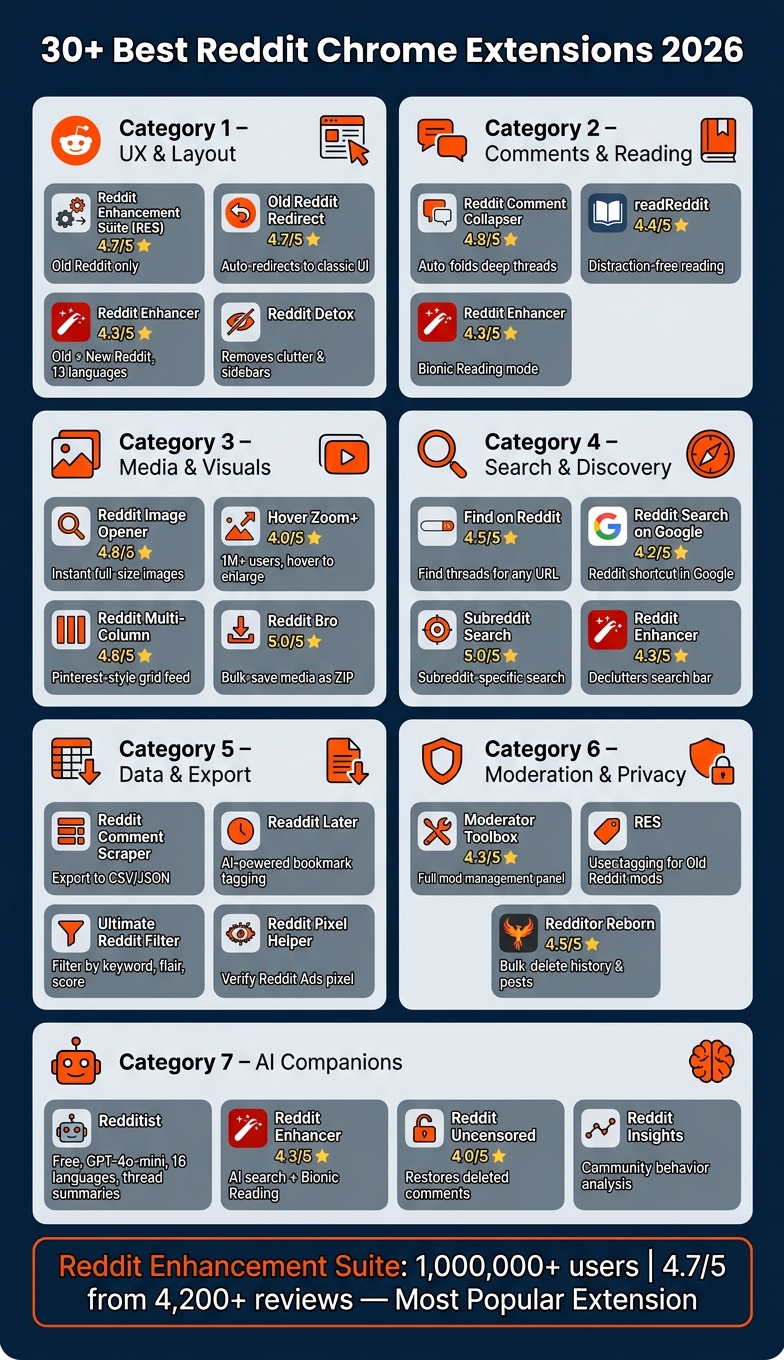
30+ Best Reddit Chrome Extensions 2026: At a Glance
1. UX and Layout Tweaks
Reddit's default layout can be a headache. From being forced into the new Reddit UI to losing dark mode or getting lost in endless sidebars, it often feels like you're battling the platform instead of enjoying it. But these extensions? They fix those pain points. Here’s how they fine-tune Reddit’s interface to make browsing actually enjoyable.
1. Reddit Enhancement Suite (RES) – Old Reddit’s ultimate sidekick
If you’re sticking with Old Reddit, RES is your go-to. It’s packed with features like night mode, infinite scroll, and user tagging - perfect for anyone who refuses to leave the classic layout. Just keep in mind, it’s strictly for Old Reddit users. It’s a fan favorite for a reason, and honestly, it’s hard to browse without it if you’re team “classic”.
2. Old Reddit Redirect – Keeping it classic, automatically
Hate the new Reddit layout? Old Reddit Redirect has your back. Every time Reddit tries to load the new interface, this extension automatically sends you to old.reddit.com. No settings, no hassle - just the classic layout every time. With a 4.7/5 rating, it’s the perfect partner for RES if you’re all about that legacy look.
3. Reddit Enhancer – For modern Reddit with serious control
Unlike RES, Reddit Enhancer works across both old and new versions of Reddit. Want to resize your feed, force dark mode, or hide promoted posts? Done. It even has Bionic Reading, which bolds the start of words to help you skim long threads faster. With support for 13 languages and regular updates (the latest in May 2026), it’s one of the most polished options out there.
"Reddit Enhancer... allows you to customise your Reddit page with just a few clicks. Supports the Old and Latest versions of Reddit." - Chrome Web Store
4. Reddit Detox – For distraction-free scrolling
If you’re tired of Reddit’s clutter, Reddit Detox is a game-changer. It strips away the noise - sidebars, recommendations, promoted posts - and adds a “Slide to See Post” feature to make you interact more intentionally. Last updated in April 2026, it’s perfect for cutting out mindless scrolling without needing to log in.
Bottom line? These extensions let you take control. Whether you’re an Old Reddit loyalist or navigating the new interface, there’s a tool here to make Reddit work for you.
sbb-itb-b3cfc51
2. Comments and Reading Tools
Let’s face it, Reddit comment threads can spiral into chaos fast. Those endless nested replies? They’re a headache when you’re trying to dig out the actual gems. Luckily, some smart tools make navigating these rabbit holes a breeze. Here’s what I’ve found works best for managing Reddit’s comment jungle.
- Reddit Comment Collapser – Perfect for Simplifying Deep Threads
Ever feel buried alive under a mountain of replies? This extension automatically folds up those massive comment chains so you can zero in on the bigger discussions. With a 4.8/5 rating on the Chrome Web Store, it’s a lifesaver for cutting through the noise.
- Reddit Enhancer – Great for Speedy Comment Browsing
If you’ve ever wished for a turbo button to get through Reddit threads, this tool delivers. Its Bionic Reading mode bolds the start of each word, making it easier to skim dense sections. Plus, it adds a button to jump straight to the next root comment, bypassing the endless sub-thread spiral. Updated as recently as May 16, 2026, it’s sitting at a solid 4.3/5 from 109 reviews.
- readReddit – Ideal for Long-Form Reads
For subreddits like r/nosleep or r/AskHistorians, where posts feel more like essays, readReddit is a game-changer. It transforms cluttered text into a clean, distraction-free format that feels like reading on Medium. No surprise it’s earned a 4.4/5 rating on the Chrome Web Store.
- Reddit Enhancement Suite (RES) – A Must for Old Reddit Fans
RES is still the go-to for anyone sticking with Old Reddit. Its features - like advanced comment tracking and tagging - make following long, layered discussions way easier. Just note, it’s built for Old Reddit, so if you’re on the newer design, Reddit Enhancer might be a better fit.
Bottom line? Whether you’re skimming for quick insights or diving into long-form posts, these tools make Reddit way more manageable.
3. Media and Visual Browsing
Reddit is packed with media, but let’s be real - its default interface makes enjoying it a chore. Every full-size image or video takes extra clicks, and that disrupts the flow. Luckily, these tools turn Reddit into a smooth, scroll-friendly media haven, cutting out the hassle and adding flair to your browsing.
-
Reddit Image Opener – Skip Reddit's Annoying Preview Pages
Ever get tired of clicking through Reddit’s lightbox overlay just to see a full-size image? Reddit Image Opener fixes that. It loads the full-size photo instantly, no extra clicks needed. With a solid 4.8/5 rating on the Chrome Web Store, it’s a must-have for image lovers. -
Hover Zoom+ – Browse Media Without Lifting a Finger
Hover Zoom+ is a lifesaver for lazy scrolling (and I mean that in the best way). Just hover over an image or video, and it enlarges automatically - no clicks required. Over 1 million users swear by it, and it holds a 4.0/5 rating. -
Reddit Multi-Column – Turn Your Feed Into a Visual Feast
If you’re into Pinterest-style layouts, Reddit Multi-Column is your go-to. It transforms your feed into a sleek, multi-column grid, perfect for scanning visuals at a glance. Bonus? It pairs beautifully with Hover Zoom+ for a seamless, click-free experience. Users rate it 4.6/5, and it’s a game-changer for visual browsing. -
Reddit Bro – Save and Organize Media Like a Pro
Need to save a ton of media without the duplicates? Reddit Bro has your back. It filters out repeats and lets you bulk-save everything into a handy ZIP file. It’s rated a flawless 5.0/5, and for media hoarders, it’s unbeatable.
These tools don’t just make Reddit easier to use - they completely change how you experience its media. Whether you’re into effortless browsing or bulk-saving, there’s something here to level up your Reddit game.
4. Search and Discovery
Reddit is packed with hidden treasures, but finding them can feel like navigating a maze. These four extensions make it easier to cut through the noise, whether you're chasing down threads related to a news story or just trying to make sense of Reddit's often chaotic search interface. By tailoring your search experience, these tools not only help you find what you're looking for but also work seamlessly with any interface upgrades you've made.
Here’s how these extensions fine-tune your Reddit search game:
-
Find on Reddit – Instantly Locate Threads for Any Page
Ever read a product review or news article and thought, "What does Reddit think about this?" With Find on Reddit, you can pull up every relevant Reddit discussion tied to the URL you're viewing. It’s rated 4.5/5 on the Chrome Web Store and saves you the headache of manual searches by delivering community insights in seconds. -
Reddit Search on Google – Add Reddit to Your Google Queries
Why jump between tabs to search Reddit manually? This extension adds a Reddit search shortcut directly to your Google results. You can instantly preview thread quality without leaving the search page. It’s free, highly intuitive, and holds a solid 4.2/5 rating. -
Subreddit Search – Focus Your Search Where It Matters
Reddit's default search often casts too wide a net, pulling results from across the entire platform when you're only interested in a specific subreddit. Subreddit Search solves this by narrowing your search to just the subreddit you're viewing. With a perfect 5.0/5 rating on the Chrome Web Store, it’s a must-have for subreddit-specific deep dives. -
Reddit Enhancer – Declutter Reddit’s Search Bar
If Reddit's search bar feels overloaded with AI suggestions, "Trending Today", and other distractions, Reddit Enhancer is your fix. It cleans up the interface, hides NSFW results, and removes unnecessary clutter, giving you a more straightforward search experience. Fully compatible with Reddit’s v3 interface, it’s rated 4.3/5 by over 100 users.
The bottom line? These tools streamline your Reddit searches, saving you time and frustration while making it easier to uncover the conversations that matter most.
5. Data and Export Tools
Once you've fine-tuned your Reddit browsing setup, diving into data tools can open up a whole new level of insights. These tools are perfect for those who want to extract, organize, and analyze Reddit content before it vanishes into the endless scroll. Whether you're researching trends, monitoring sentiment, or just trying to keep track of interesting threads, here are some standout options:
-
Reddit Comment Scraper & Comments Exporter – Export Threads to CSV or JSON
Want to archive entire comment threads for analysis or marketing? This tool lets you export them to CSV or JSON formats. Just make sure you're sticking to Reddit's API rules while using it. -
Readdit Later – AI-Powered Bookmarks
Ever lose track of a post you wanted to revisit? Readdit Later uses AI to tag and organize your saved posts by topic, making it a breeze to retrieve them when needed. -
Ultimate Reddit Filter – Granular Filtering Across Subreddits
This extension is a lifesaver if you're chasing specific topics. You can filter content by keywords, post flair, score thresholds, or even post types, ensuring you only see what's relevant while blocking out the noise. -
Reddit Pixel Helper – Verify Your Reddit Pixel's Performance
For marketers running Reddit Ads, this tool helps you check if your Reddit Pixel is working correctly on your site. It’s a straightforward way to troubleshoot conversion tracking issues.
One thing to keep in mind: most reliable export tools save data locally in your browser rather than sending it to external servers. Always double-check the Privacy section on the Chrome Web Store before installing any data-focused extension to ensure the developer's practices align with your expectations.
Up next, we’ll dive into tools designed for moderation, privacy, and cleaning up your Reddit account for a more streamlined experience.
6. Moderation and Privacy Tools
If you’re juggling the chaos of a bustling subreddit or just trying to tidy up your Reddit presence, these tools make life way easier. They simplify moderation duties while giving you more control over your privacy on the platform.
-
Moderator Toolbox for Reddit – A Must-Have for Subreddit Mods
With a 4.3/5 rating on the Chrome Web Store, this tool packs everything you need for subreddit management. It adds panels for tracking posts, managing users, and logging moderation actions - all without leaving the page. As Edward from ThinkDesignBlog puts it:"Moderator Toolbox is perfect for people who manage Reddit communities. It adds powerful tools for monitoring posts, managing users, and keeping communities safe."
-
Reddit Enhancement Suite (RES) – User Tagging Made Simple
For Old Reddit fans, RES offers a game-changing feature: user tagging. Mods can label and track accounts easily, making it a go-to for staying organized. -
Redditor Reborn – Wipe Your History in One Click
Sitting at a 4.5/5 rating, Redditor Reborn is the stress-free way to bulk-delete comments, posts, and browsing history. Whether you're stepping back from Reddit or just want to separate your mod activity from your personal account, this tool gets the job done fast.
These extensions don’t just help moderators keep communities on track - they also give users the tools to manage their Reddit footprint with ease.
7. AI Companions
AI has become a game-changer for Reddit users, bringing in tools that simplify browsing, cut through clutter, and even recover deleted content. Some of the best Chrome extensions now offer features like thread summaries, noise filtering, and automated comment restoration - all designed to make your time on Reddit more productive.
Redditist is a standout option if you feel swamped by never-ending threads. It uses the GPT-4o-mini model to break down Reddit posts and top comments into bite-sized summaries. Supporting 16 languages, it works with both Old and New Reddit. Plus, it’s free and open-source. The only catch? You’ll need your own OpenAI API key from platform.openai.com, and you only pay for the API usage.
Here’s how AI companions are changing the way we engage with Reddit:
- Thread summarization with Redditist: Just plug in your OpenAI API key, set a comment limit, and let Redditist deliver quick, digestible summaries of long threads.
- Faster scanning with Bionic Reading: The Reddit Enhancer extension (rated 4.3/5 from 109 ratings) includes a Bionic Reading mode that highlights key phrases, making it easier to skim through posts.
- Community insights via Reddit Insights: Want to understand what makes a subreddit tick? This extension analyzes user behavior and browsing patterns, giving you a deeper look into community dynamics during discussions.
- Restoring deleted content with Reddit Uncensored: Ever wished you could read that deleted comment? With the Arctic Shift API, this tool (rated 4.0/5) pulls deleted comments back into threads without needing to visit external archive sites.
- AI-powered search with Reddit Enhancer: This extension adds an "Ask" button to Reddit’s search bar, letting you use natural language to search. If it feels too intrusive, you can easily switch back to the original search bar.
- Keyword filtering in Focus Mode: AI-driven filters let you set specific keywords, ensuring your feed only shows posts that align with your interests. It’s a great way to turn Reddit into a focused research tool.
These tools put you in the driver’s seat, letting you control how you consume and interact with Reddit content. Whether you’re skimming threads, diving into community data, or recovering lost comments, AI is making every aspect of browsing more efficient and tailored to your needs.
Conclusion
After diving into extensions for just about every Reddit need, one thing's clear: the right tools can completely shift how you navigate the platform. Reddit’s mix of endless content and chaotic design can be overwhelming, but tailored Chrome extensions help cut through the noise. Whether you're after a more polished layout, quicker comment navigation, smarter media handling, or even AI-driven thread summaries, there’s something out there for you.
The trick? Don’t overdo it. Take Reddit Enhancement Suite as an example - it’s got over 1,000,000 users, a stellar 4.7/5 rating from 4,200+ reviews, and covers a ton of ground. But piling on redundant extensions can bog down your browser. Stick to tools that genuinely add value, and don’t forget to regularly clean out ones you’ve stopped using. Oh, and always check permissions before installing - if something’s asking for sweeping access to your data, tread carefully and stick to developers with strong reviews and clear privacy policies.
The extensions we’ve covered here cater to everyone - from Old Reddit diehards to analytics geeks to community moderators. There’s no one-size-fits-all setup. If you’re a casual user, lightweight tools like Old Reddit Redirect or Reddit Comment Collapser might do the trick. Power users, on the other hand, might want to dive into options like GigaBrain, Readdit Later, or Moderator Toolbox. Start with what fixes your biggest Reddit headache and expand from there.
Bottom line? A thoughtfully chosen set of extensions can turn Reddit from a time-wasting rabbit hole into a tool that works for you.