If you're still posting natively across every platform, you're burning time you probably don't have. For me, after testing 50+ social tools every week at TopSocialTools.com, the answer is pretty simple: the right tool should help you schedule content, track results, handle replies, manage approvals, and connect social to leads or sales without turning your week into admin work.
Here’s the short version over coffee:
- Social is too big to run by hand now. There are 5.4 billion+ social media accounts worldwide, and people use 7.5 platforms on average.
- AI is now part of the baseline. 73% of marketers use at least one AI tool in their social workflow.
- Batch scheduling saves time. I’ve seen teams save 4–5 hours per week just by planning posts in bulk.
- The main things these tools fix are:
- posting across channels
- reporting in one place
- approvals and team workflow
- inbox management for comments, mentions, and DMs
- In my testing, the best platforms in 2026 need to cover:
- content calendars and bulk scheduling
- post timing suggestions
- analytics and report exports
- AI help for drafts
- social listening
- team permissions and approval flows
- CRM links like Salesforce and HubSpot
- Pricing usually falls into three buckets:
- $10–$50/month for starter tools
- $50–$200/month for mid-tier tools
- $300+/month for enterprise plans
- Tool fit matters more than feature sprawl:
- Buffer: simple and low-cost for solo users or small teams
- Later: strong for Instagram/TikTok-first brands
- Hootsuite: built more for big teams
- Sprout Social: strong reporting and CRM links, but pricey
- Agorapulse: good inbox and ROI tracking for community teams
- CoSchedule: better for editorial and campaign planning
5 Best Social Media Management Tools for Agencies in 2026 | ClickUp
sbb-itb-b3cfc51
Quick Comparison
| Tool | Best For | Main Strength | Main Limitation | Price Level |
|---|---|---|---|---|
| Buffer | Solo creators, small teams | Simple scheduling and low-cost entry | Limited inbox and listening | Low |
| Later | Visual brands | Instagram/TikTok planning | Less suited for text-heavy channels | Mid |
| Hootsuite | Large teams | Broad channel support | Higher cost, busier UI | High |
| Sprout Social | Data-focused teams | Reporting, inbox, CRM ties | High per-user cost | Premium |
| Agorapulse | Community managers | Inbox and ROI reporting | Fewer integrations | Mid-High |
| CoSchedule | Content teams | Editorial planning | Less depth in listening | Mid |
Ever wonder what actually matters before you buy? For me, it comes down to your bottleneck: posting, approvals, reporting, replies, or proving ROI. That’s what I’d match first. The bottom line: pick the tool that fits how your team works every day, not the one with the flashiest sales demo.
What Social Media Management Tools Are and How Businesses Use Them
For me, social media management tools stop social from turning into daily chaos. They give teams one dashboard to plan, publish, watch replies, and check performance, so you're not bouncing between five tabs and a pile of spreadsheets. I've seen small teams use them to cut manual work, keep campaigns on track, and run multiple channels without that constant "what did we post where?" scramble.
From basic schedulers to full marketing platforms
I remember when these tools were mostly just schedulers. You'd load up posts, set dates, and call it a day. That helped, sure, but it only solved one small part of the job.
Now the stronger platforms do a lot more. In my testing, the real difference-maker is how they pull the whole workflow into one place: a visual content calendar, approval steps, one inbox for comments and DMs, listening features, deep analytics, and AI help for drafts and post ideas. That's the line between a simple posting tool and an actual management platform.
A good example is how teams use tools that connect with Salesforce and HubSpot. When that setup works, social messages don't just sit in a silo. They can tie into contact records, lead gen, and pipeline tracking, which gives marketing teams a much clearer read on what social is doing for the business. I've seen this matter a lot for B2B brands in particular, where one LinkedIn conversation can turn into an actual sales opportunity if the handoff is clean.
What I've learned is pretty simple: this category isn't just about publishing anymore. It's about workflow.
How they improve efficiency, consistency, and ROI
Here's what I noticed after testing a lot of these platforms: the payoff usually comes from boring stuff done well. Less manual work, tighter brand control, and a cleaner path to ROI - that's what teams are paying for.
Bulk upload is a good example. Instead of posting one by one all week, a team can batch two or three weeks of content in one sitting. That alone saves a ton of time. Then you've got approval flows, which matter more than people think. A junior marketer can draft posts, but nothing goes live until a manager checks it first. That keeps the brand voice steady across channels, especially when multiple people touch the account.
I've also seen stronger platforms help with attribution. When a tool connects social activity to traffic, leads, and revenue, you're no longer guessing whether a campaign did anything beyond getting likes. That changes the conversation fast, especially with clients or leadership who care about dollars, not vanity metrics.
The tricky part is that plenty of tools promise all this, but not all of them handle workflow and reporting with the same depth.
Key Features to Look for in Social Media Management Tools in 2026
After testing social tools every week at TopSocialTools.com, I’ve noticed one thing fast: a basic scheduler might save you a few minutes, but it won’t run your social operation. In 2026, the tools worth paying for need to handle publishing, reporting, teamwork, and day-to-day action in one place. That’s the line between “just posting” and actually managing a brand.
I’ve seen this play out with creators, in-house teams, and agencies alike. One tool looks fine on the surface, then falls apart the second you need approvals, reporting, or a clean way to reply to DMs without chaos. That’s usually where the gap shows up. What actually moved the needle was finding platforms that connect the whole workflow instead of patching together five tabs and a prayer.
Scheduling, publishing, and content planning
This is where most people start, and fair enough. But for me, scheduling only matters if the tool gives you control without turning content planning into busywork.
Look for visual calendars, bulk uploads, per-platform post customization, and short-form video support. Visual calendars and post previews are standard now, so I don’t treat them as a selling point anymore. They’re table stakes. The better tools let you take one base post and tweak it for each platform before it goes live - a different caption for LinkedIn, a shorter edit for TikTok, and different hashtags for Instagram.
Short-form video support for Reels, TikTok, and Shorts is now a must. If a platform still treats short-form video like an add-on, I’m usually out. I’ve tested tools that handled static posts well but made video publishing feel clunky, and that’s a killer when your content mix leans even slightly into creator mode.
AI-powered scheduling is landing in more tools too. The better versions analyze engagement patterns and suggest posting times based on what your audience actually does, not just some generic “best time to post” chart. That’s becoming the new baseline, not some fancy extra. For me, if a tool can’t help with timing in a smart way by now, it already feels behind. The tricky part is finding one that does this cleanly without making you fight the interface.
Analytics, AI support, and social listening
Once posts are live, this is where the truth shows up. A tool can look slick in a demo, but if the reporting is shallow, you’re flying blind.
Strong reporting goes past likes and follower counts. I always look for unified dashboards with post-level and campaign-level metrics, plus automated report exports that save teams from rebuilding the same report every week. If I have to jump between dashboards just to explain what worked, that tool starts losing points fast.
AI support can help here too, especially with caption drafts and trend forecasting. Used well, it saves time. Used badly, it spits out bland filler that sounds like every brand on the internet. I’ve seen this with tools that promise AI magic but mostly hand you forgettable captions. The better ones give you a solid draft and let you shape it, which is a lot more useful in the real world.
Then there’s social listening. Real-time mention monitoring and sentiment analysis help teams catch issues early and keep tabs on competitors before a small problem turns into a bigger one. I’ve seen brands miss easy opportunities simply because their tool only showed direct tags and skipped the broader conversation. That’s a huge blind spot when social moves this fast. Bottom line: if reporting tells you what happened, listening helps you react before the moment passes.
Collaboration and CRM integration
The second more than one person touches the account, clean collaboration stops being optional. This is where a lot of “pretty good” tools start to crack.
Approval workflows and role-based permissions are non-negotiable. Multi-level approval chains keep brand voice steady and cut the risk of something going live before it’s ready. I’ve worked through tools where one wrong click could publish a draft too early, and that kind of slip gets expensive fast when clients or execs are watching.
Unified inboxes matter just as much. A good one keeps messages, comments, and DMs in one stream, and duplicate-response alerts stop two team members from replying to the same person at the same time. Sound simple? It is. But when it’s missing, the whole support side of social turns into pure mess.
On the integration side, CRM connections to Salesforce and HubSpot keep social activity tied to pipeline reporting. That matters a lot more than people think, especially for B2B teams and agencies trying to prove social isn’t just a top-of-funnel vanity play. I’ve seen teams finally connect campaign replies and lead activity back to revenue once those CRM links were in place, and suddenly social had a seat at the grown-up table.
For agencies, client-facing review features are a quiet time-saver. If clients can approve content through a shared link without needing a login, you cut a ton of back-and-forth. That may not sound glamorous, but it saves hours over the course of a month. What I’ve learned is simple: the best tools don’t just help you post - they help people work together without friction.
How to Compare and Choose the Right Tool
Best Social Media Management Tools 2026: Side-by-Side Comparison
When I’m helping creators or marketing teams pick a social tool, I don’t start with brand names. I start with the mess. What’s slowing you down right now - posting, approvals, reporting, or keeping up with replies? That’s usually where the right pick shows itself.
For me, the fastest way to narrow the field is simple: match the tool to your workflow, scale, and budget. A solo creator doesn’t need the same setup as a five-person content team, and a growing brand usually outgrows cheap schedulers faster than they expect. The best tool isn’t the one with the longest feature list. It’s the one your team will actually use every week. That’s the bottom line I keep coming back to.
Define your goals, budget, and required workflows
I’d start with your biggest bottleneck. If approvals are slowing everything down, rule out tools that don’t handle approval flows well. If reporting keeps eating hours, cut anything with weak analytics. That first filter saves a ton of time.
From there, line things up against scale and price. In the U.S. market, pricing usually lands in three tiers:
- Starter: $10–$50/month
- Mid-market: $50–$200/month
- Enterprise: $300+/month
I’ve seen people waste weeks testing tools that were never a fit because they skipped this step. One creator I worked with loved a sleek visual planner, but her team needed approval cycles and better reporting, so the tool fell apart the second brand deals picked up. What actually moved the needle was getting clear on must-have workflows before getting distracted by nice-looking dashboards.
Compare common tool types and examples
Most platforms land in a few main buckets: lightweight schedulers, visual planners, analytics-first platforms, and enterprise suites. That sounds neat on paper, but in my testing, the differences show up fast once you’re inside the dashboard.
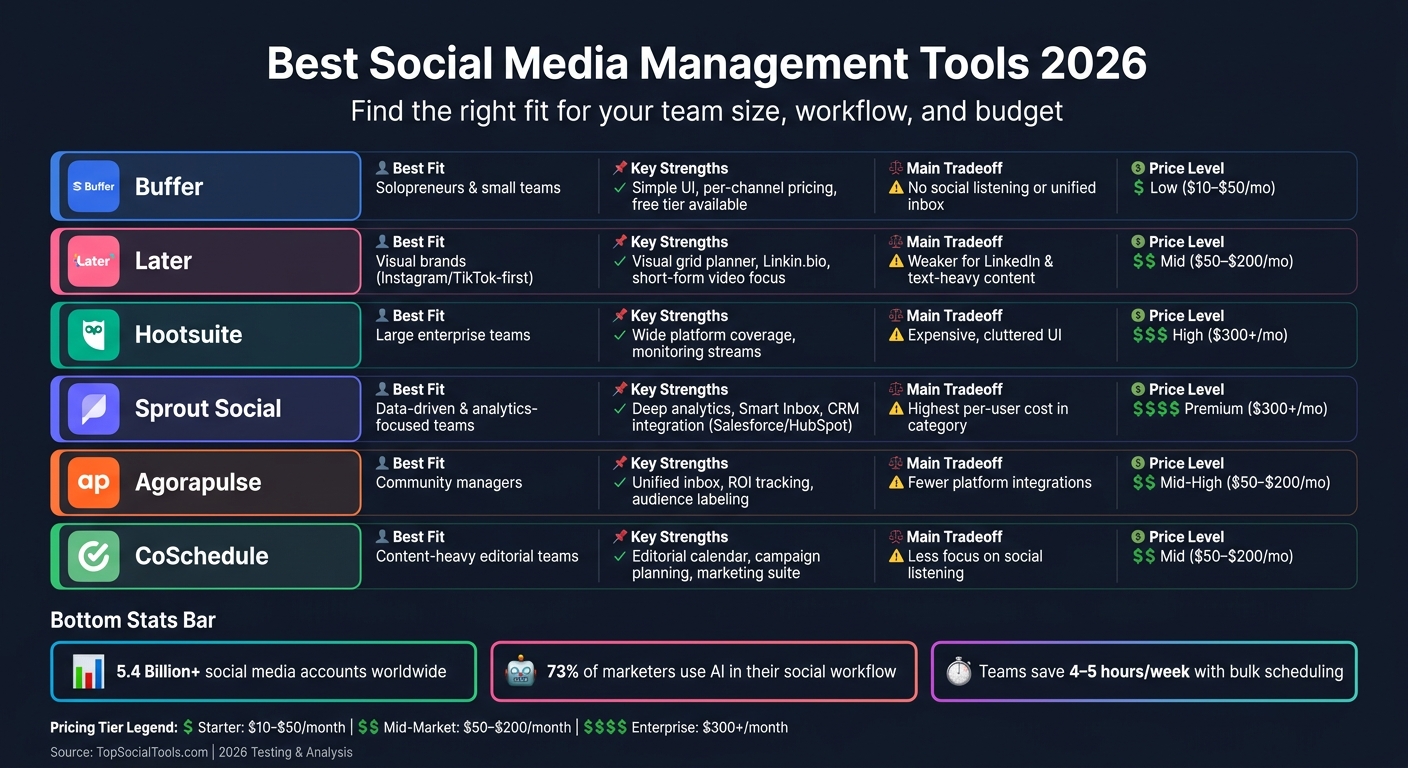
Buffer tends to work well for solopreneurs and small teams that want simple per-channel pricing. Later fits visual brands that live on Instagram and TikTok. Hootsuite leans toward enterprise teams that need broad platform coverage and tighter access control. Sprout Social is a better fit for data-driven teams that care a lot about analytics and CRM connections. Agorapulse sits in that solid mid-tier lane for community managers who need a unified inbox and ROI tracking. CoSchedule makes more sense for content-heavy teams planning around editorial calendars and campaigns.
Here’s the side-by-side view:
| Tool | Best Fit | Key Strengths | Tradeoffs | Pricing Level |
|---|---|---|---|---|
| Hootsuite | Enterprise teams | Wide platform coverage, monitoring streams | Expensive, cluttered UI | High |
| Buffer | Solopreneurs / small teams | Simple UI, per-channel pricing, free tier | No social listening or unified inbox | Low |
| Sprout Social | Data-driven brands | Deep analytics, Smart Inbox, CRM integration | Highest per-user cost in the category | Premium |
| Later | Visual brands | Visual grid planner, Linkin.bio, Instagram/TikTok focus | Weaker for LinkedIn and text-heavy content | Mid |
| Agorapulse | Community managers | Unified inbox, ROI tracking, audience labeling | Fewer platform integrations | Mid-High |
| CoSchedule | Content-heavy teams | Editorial calendar, campaign planning, marketing suite | Less focus on social listening | Mid |
Here’s what I noticed after testing tools like these week after week: the tradeoffs matter more than the headline features. Later can feel great for a visual-first brand, but if your team pushes a lot of LinkedIn posts or text-heavy content, the cracks show. Sprout Social has strong data tools, but the per-user cost can sting fast once more people need access. That’s the tricky part.
Build and test a shortlist with TopSocialTools
Once you’ve narrowed things down, don’t commit off a sales page. Run two or three tools through real work. That means scheduling a week of posts, pulling a report, and putting at least one approval cycle through the system. Free trials usually run 14 to 30 days, and that’s enough time to spot friction before you’re locked in.
At TopSocialTools, this is the step I keep pushing because it cuts through the marketing fluff fast. You can use TopSocialTools to filter by use case, pricing, platforms, and integrations before testing two or three finalists. I’ve done this myself plenty of times when a tool looked perfect in the demo but got clunky in daily use.
What I’ve learned is pretty simple: shortlist hard, test in live conditions, and pay attention to where your team gets stuck.
Where Social Media Management Is Heading and What to Remember
What comes next: AI workflows, predictive analytics, and deeper integrations
I’ve seen this shift fast over the last couple of years testing social tools every week: social media management isn’t just about queuing posts anymore. It’s moving from plain scheduling into automation, and that line between basic tools and serious platforms is getting wider by the month.
What actually moved the needle in my testing wasn’t a prettier calendar view. It was AI that could help draft a post, tweak it for each channel, and get it scheduled without me babysitting every step. Tools with smart scheduling, trend forecasting, and caption support are starting to feel less like a nice extra and more like the default. If a platform still treats those features like a bonus, it already feels behind.
I’ve also noticed buyers care a lot more about revenue attribution now. That makes sense. Likes are nice, but teams want to know what content led to pipeline, sales, or sign-ups. Deeper integrations are turning social data into something marketing and sales teams can actually use across the stack. In practice, that means your social tool can’t live on an island anymore.
Predictive analytics is heading the same way. As teams plan content earlier, they want more than a rearview mirror. They want signals on what may work next, where to post it, and when to push it. At the same time, channel-specific publishing is taking over the old habit of blasting the same copy everywhere. I ran into this with a tool that handled LinkedIn well but still treated Threads like an afterthought. That gap matters when platform fragmentation keeps growing and newer networks like Threads and Bluesky get added to an already messy stack. The tricky part is that more channels don’t just mean more content. They mean more nuance.
Key points to remember before you buy
This is where teams get tripped up. I’ve seen people buy based on a flashy feature sheet, then realize three weeks later the tool doesn’t fit how their team actually works.
The wrong platform gets old fast, especially when pricing, adoption, and ROI can look wildly different depending on team size and workflow. For me, the first step is always strategy. Figure out which platforms matter most, where your bottleneck sits, and what you need the tool to fix. If your team struggles with approvals, a publishing-first tool won’t solve much. If reporting is the pain point, a cheap scheduler may just add friction.
Once your goals are clear, match the platform to the workflow you already have instead of bending your team around the software. I’ve seen small creator teams overspend on enterprise setups, and I’ve seen big teams pick low-cost tools that fall apart the second approvals, analytics, and client access enter the picture. Sound familiar? It happens all the time.
Before signing anything, I’d check a few things closely:
- Platform coverage, including newer networks like Threads and Bluesky
- Pricing structure, especially whether it scales by user or by social profile
- Add-on charges for things like premium analytics or social listening
- Trial length, since most tools offer 7- to 30-day free trials
One thing I always tell marketers over coffee: don’t settle for a polished demo. Run a real trial with your own workflow, your own accounts, and your own approval mess. I did this with one platform that looked sharp in sales calls, but once I added multiple users and extra profiles, the cost climbed fast and the reporting I wanted sat behind another paywall. That’s the stuff you only catch when you actually use it.
What I’ve learned is pretty simple: compare tools against how your team works day to day, not just against a long list of features.