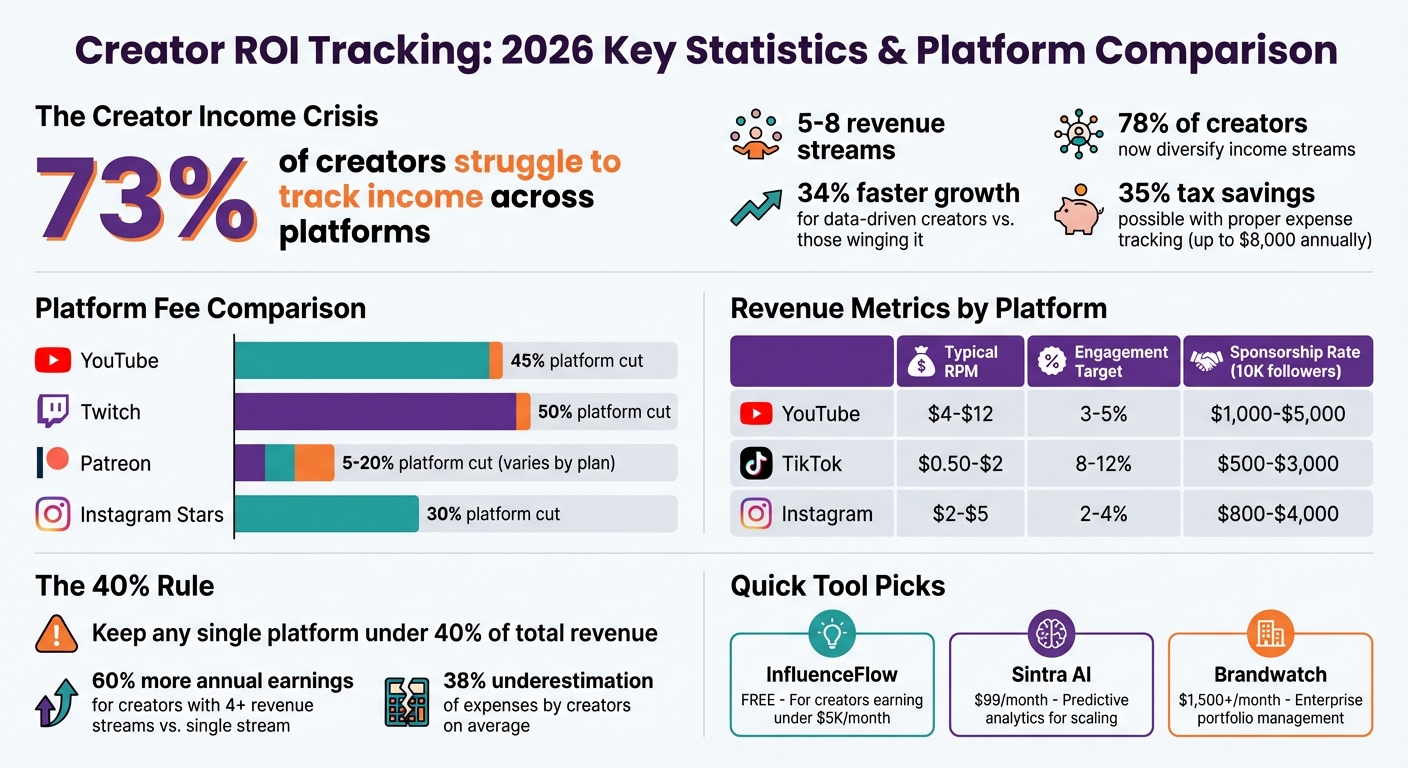
Creators are leaving money on the table. With 73% struggling to track income across platforms, it’s no wonder financial chaos reigns in the creator economy. In 2026, tracking ROI isn’t optional - it’s survival. From YouTube AdSense cuts to TikTok Shop commissions and Patreon fees, you need tools that show exactly where your money’s coming from - and how to keep more of it.
The best ROI tracking tools do the heavy lifting: consolidating revenue streams, flagging your most profitable content, and even prepping tax-ready reports. Whether you’re a micro-creator juggling five revenue streams or an agency managing millions, this guide breaks down 8 top tools to simplify your hustle.
Quick Picks:
- InfluenceFlow: Free, multi-platform tracking for creators earning under $5K/month.
- Brandwatch: Enterprise-level powerhouse for managing massive influencer portfolios.
- Sintra AI: Predictive analytics for creators ready to scale.
Bottom line? Stop guessing where your money’s going. These tools turn chaos into clarity, no matter your stage.
Creator ROI Tracking Statistics and Platform Comparison 2026
How to Measure Influencer Marketing ROI (5-Step Guide + Formula Explained)
sbb-itb-b3cfc51
Why Creators Need ROI Tracking in 2026
In 2026, the average creator juggles 5–8 revenue streams - think YouTube AdSense, TikTok Shop commissions, Patreon, brand deals, affiliate links, and digital product sales. Sounds like a lot? It is. Each platform plays by its own rules, with different payout schedules and fees. YouTube takes 45% of ad revenue, Twitch grabs half of subscriptions, and Patreon charges 5–20%, depending on your plan. Managing all that without a proper system? Nearly impossible. No wonder 73% of creators admit they struggle to track income accurately across platforms.
Here’s the kicker: data-driven creators grow 34% faster than those winging it. But it’s not just about growth - taxes are a whole other beast. The IRS now demands timestamped, organized records for all self-employment income, and a messy spreadsheet won’t cut it in 2026. Add in PayPal’s 2–3% currency conversion fees and regional tax laws like VAT or GST, and compliance becomes a headache without the right tools.
"The IRS requires detailed records of all self-employment income. In 2026, this means proving where every dollar came from." - InfluenceFlow
Platform dependency is a silent income killer. Experts warn against letting any single platform make up more than 40% of your revenue. Why? Because when YouTube tweaks its algorithm or TikTok changes its Creator Fund, your income can nosedive. 78% of creators now diversify their income streams, and 72% of top earners work across three or more platforms to stay afloat. On top of that, tracking expenses properly can save you 35% in taxes - up to $8,000 annually. But here’s the catch: you’ve got to track those expenses accurately.
Managing Income Across Multiple Platforms
Manual tracking is a time sink - and it’s riddled with gaps. Each platform spits out data in its own quirky way:
- Instagram Insights shows engagement but skips revenue.
- YouTube Studio tracks AdSense but ignores sponsorships.
- TikTok Creator Fund doesn’t include TikTok Shop sales.
- Patreon logs subscriptions but misses PayPal tips.
This chaos leads creators to underestimate expenses by 38% on average. That’s a recipe for overpaying taxes or facing nasty surprises during audits.
And then there’s cash flow. Inconsistent payout schedules wreak havoc on your finances. Knowing your Monthly Recurring Revenue (MRR) from subscriptions versus one-off payments is crucial for surviving lean months. Without automation, reconciling bank statements and platform reports is a nightmare. But creators who actively track their earnings see a 23% revenue boost in just six months because they can pinpoint what’s actually working.
The "40% Rule" is your lifeline against algorithm changes. If YouTube suddenly accounts for 80% of your income and slashes its revenue share, you’re in trouble. Unified tracking tools let you monitor this in real time, so you can pivot your strategy before disaster strikes. Plus, creators with four or more revenue streams earn 60% more annually than those who stick to just one.
Key ROI Metrics to Track
Gross revenue is meaningless if you don’t know your net take-home. That’s why tracking Revenue Per Viewer (RPV) is key - it shows how efficiently you’re earning across platforms:
| Metric | YouTube | TikTok | |
|---|---|---|---|
| Typical RPM | $4–$12 | $0.50–$2 | $2–$5 |
| Platform Cut | 45% | Varies | 30% (Stars) |
| Engagement Target | 3–5% | 8–12% | 2–4% |
| Sponsorship Rate (10K followers) | $1,000–$5,000 | $500–$3,000 | $800–$4,000 |
Another game-changer? Earned Media Value (EMV). It’s like asking, “What would this content cost as an ad?” The formula: Impressions × CPM. So, if your TikTok hits 500,000 impressions at a $10 CPM, its EMV is $5,000. This metric is gold for justifying sponsorship rates and showing your content’s worth beyond direct sales. Similarly, Customer Lifetime Value (CLV) tracks how much revenue you can expect from a single fan. For example, a Patreon subscriber paying $10/month for 18 months has a CLV of $180.
Multi-touch attribution is now non-negotiable. The old “last-touch” model, where only the final interaction gets credit for a sale, misses the bigger picture. Newer models spread credit across the entire customer journey, helping you see which content - be it Instagram Stories, TikTok clips, or long-form YouTube videos - actually drives revenue. And then there’s Cost Per Acquisition (CPA): divide your campaign spend by the number of conversions. If you spend $500 on a post that nets 50 Patreon sign-ups, your CPA is $10. This data helps you fine-tune your campaigns for better returns.
"73% of marketers struggle with attribution. But with the right approach, you can solve this problem." - Influencer Marketing Hub
Where your audience lives matters, too. US viewers generate 3–5× higher CPMs than international ones. If most of your audience is overseas, your YouTube RPM will likely hover on the lower end of $4–$12. Knowing your audience’s location helps you decide whether to focus on high-CPM regions or diversify into revenue streams that aren’t tied to geography.
2026 Trends Affecting ROI Tracking
IRS audits are hitting creators hard in 2026. The IRS now demands timestamped, digital records for every payment and expense. Without an automated system, you risk penalties - or worse, leaving money on the table. Tools that log payments, categorize expenses, and maintain a 7-year audit trail are no longer optional.
Platform fees keep climbing. YouTube takes 45%, Twitch grabs 50%, and Instagram charges 30% for Stars revenue. Unified tracking tools calculate your net revenue after these cuts, so you know exactly what you’re working with. A $10,000 gross month looks a lot different when your net is only $6,500.
AI-driven fraud detection is now the norm. With 25% of influencers inflating their metrics, brands are demanding proof of authenticity. Modern ROI tools use machine learning to spot fake followers and sketchy engagement patterns, ensuring only real interactions count. Manual tracking just can’t keep up with these demands. To stay competitive, creators need automated systems that handle all this complexity seamlessly.
Top 8 Creator ROI Tracking Tools Reviewed
Keeping tabs on every dollar you earn is non-negotiable. The right ROI tools strip away the guesswork, helping creators see their actual earnings after platform cuts, forecast income trends, and ensure engagement metrics are legit. With income coming from so many directions these days - YouTube, TikTok, Patreon, merch sales - these tools are like your financial command center, ready to handle audits and compliance headaches too.
Each tool has its own spin. Some are all about pulling data from every platform into one clean dashboard. Others lean on AI to forecast earnings based on your posting habits and seasonal trends. A few even guard against fake engagement by spotting bots. The trick? Picking the one that matches your specific needs - whether it’s tracking revenue after fees, analyzing brand deals, or syncing with your e-commerce setup.
Prices range from free plans to enterprise-level options. For instance, InfluenceFlow offers a free plan, perfect for creators earning under $5,000 a month. On the flip side, platforms like Brandwatch and Grin cater to top-tier creators and agencies, with plans starting at $1,500+ per month. Below, we’ve broken down eight tools that tackle common creator pain points, from tracking net revenue to managing multiple income streams.
InfluenceFlow
InfluenceFlow is the budget-friendly option for creators just starting to monetize. If you’re earning between $500 and $50,000 a month, it’s a solid pick for streamlining income tracking and managing brand deals. The platform connects to all the big players - YouTube, TikTok, Instagram, Twitch, and Patreon - and pulls your revenue data into a single dashboard. No credit card required.
Its pricing is straightforward: free forever. That’s right - no monthly fees, making it an easy win for creators who need basic tools like invoicing, media kit templates, and rate card calculators. However, it’s not built for advanced needs like fraud detection or predictive analytics, so it’s best for those still growing their revenue.
Key features include multi-platform revenue tracking and tax-ready reporting. It calculates your net revenue after platform fees, giving you a clear picture of what’s actually hitting your bank account. Plus, it tracks expenses like equipment and travel, making tax season a little less painful. While it doesn’t have AI-driven forecasting, it does offer growth charts and alerts if you’re relying too heavily on one income source.
| Pros | Cons |
|---|---|
| Free forever with no hidden costs | No AI-powered forecasting or fraud detection |
| Combines income from multiple platforms | Limited reporting compared to pricier tools |
| Tax-ready tracking for expenses and invoicing | No multi-touch attribution modeling |
| Easy setup - no credit card needed |
Best for: Micro-creators (10K–100K followers) and mid-tier creators (100K–1M followers) earning under $5,000 monthly. For those needing more advanced features down the road, tools like Sprout Social or Brandwatch are worth exploring. Full review →
[image:influenceflow-dashboard]
Sintra AI
Sintra AI is for creators who geek out over data. It uses machine learning to predict your future earnings based on past performance, seasonal trends, and content mix. If you’ve got consistent revenue and want to fine-tune your strategy, this tool is a game-changer.
Plans start at $99/month for the Starter tier, which covers basic predictive analytics and dashboards for three platforms. The $249/month Professional plan adds multi-touch attribution, bot detection, and API access, while the custom-priced Enterprise plan is tailored for agencies managing multiple accounts.
What makes Sintra AI shine? Its AI-driven content optimization. It doesn’t just track what worked before - it tells you when to post, which hashtags to use, and what formats will bring in the most cash. It also calculates Revenue Per Viewer (RPV) across platforms, so you’ll know if your YouTube RPM of $4–$12 is outperforming TikTok’s $0.50–$2 range. For affiliate links and sponsored posts, UTM tracking ensures every click is accounted for.
| Pros | Cons |
|---|---|
| Predicts revenue 3–12 months ahead | Pricey for creators earning under $10K/month |
| Offers content optimization tips | Steep learning curve for new users |
| Tracks revenue per viewer across platforms | Needs consistent data for accurate forecasts |
| Detects bots and fake engagement | Free trial only lasts 7 days |
Best for: Mid-tier creators (100K–1M followers) looking to shift from reactive tracking to proactive planning. If free tools like InfluenceFlow aren’t cutting it anymore, Sintra AI’s insights can help you level up. Full review →
[image:sintra-ai-dashboard]
Sprout Social
Sprout Social is built for creators working with teams - whether that’s managers, editors, or agencies. Its standout feature? Tracking how engagement (likes, comments, shares) converts into real revenue, from Patreon sign-ups to product sales.
Pricing starts at $249/month for the Standard plan, which covers five social profiles and basic ROI reporting. The $739/month Advanced plan adds perks like competitive benchmarking and custom workflows. For agencies managing dozens of creators, there’s an Enterprise option with custom pricing.
Sprout Social’s real strength lies in engagement-to-sale attribution. It maps out the customer journey - from an Instagram Story view to a final purchase - crediting each touchpoint along the way. Plus, it integrates with Shopify and WooCommerce, calculating Customer Lifetime Value (CLV) for your most loyal fans.
| Pros | Cons |
|---|---|
| Tracks engagement-to-revenue conversion | High price point for smaller creators |
| Great for team collaboration | No AI-powered forecasting tools |
| Syncs with e-commerce platforms like Shopify | Standard plan limits social profiles |
| Customizable workflows and reports | Enterprise plans can get expensive |
Best for: Creators earning $10,000+ per month who need detailed attribution and team management features. Full review →
[image:sprout-social-dashboard]
Side-by-Side Comparison Tables
When it comes to tracking revenue with precision, these tables give you a clear snapshot of which tools fit your needs. They break down everything from attribution methods to pricing, helping you find the perfect match for your creator stage.
ROI Features Comparison
This table highlights key differences in attribution models, forecasting capabilities, and how quickly data updates - essential details for creators juggling multiple platforms.
| Tool | Attribution Methods | Forecasting Capabilities | Platforms Covered | Data Latency |
|---|---|---|---|---|
| InfluenceFlow | Direct payment & contract tracking | Revenue trend analysis | YouTube, TikTok, Instagram, Twitch, Patreon | Real-time / Daily |
| Sintra AI | Multi-touch (linear, time-decay, position-based) | 3–12 month predictive analytics | YouTube, TikTok, Instagram, Twitch, Shopify | Near real-time |
| Sprout Social | Multi-channel attribution | competitor benchmarking | All major social platforms, Shopify, WooCommerce | Every few minutes |
| Brandwatch | First-touch, last-touch, custom models | Audience quality scoring | YouTube, Instagram, TikTok, Twitter, Facebook | Daily updates |
| Upfluence | E-commerce integration & UTM tracking | Performance prediction by content type | Major social + Shopify/Stripe | Near real-time |
| Traackr | Engagement-to-conversion mapping | Relationship ROI scoring | YouTube, Instagram, TikTok, Twitter | Daily updates |
| AspireIQ | CRM-based attribution | Campaign performance forecasting | Major social platforms | Daily updates |
| Grin | Integrated e-commerce & payments | Performance prediction | Major social + Shopify/Stripe | Near real-time |
If speed is your priority, Sprout Social stands out with updates every few minutes, making it ideal for real-time adjustments. Meanwhile, InfluenceFlow and Grin excel in platform coverage, pulling data from payment processors (like Stripe and PayPal) alongside social media . These capabilities are a game-changer for creators managing income streams across multiple platforms.
Pricing and Value Comparison
Different tools bring varying payback timelines, from immediate benefits with free tools to long-term savings on enterprise platforms. Here's a breakdown:
| Tool | Starter Pricing | Free Trial | ROI Payback Time |
|---|---|---|---|
| InfluenceFlow | $0 (Free forever) | N/A (Always free) | Immediate (No upfront cost) |
| Sintra AI | $99/month | 7 days | 1–3 months (Optimizes high-performing content) |
| Sprout Social | $249/month | No | Fast for teams earning $10K+/month (Efficiency gains) |
| Brandwatch | Custom (typically $1,500+/month) | No | High for enterprise (Prevents fraud, automates workflows) |
| Upfluence | $99/month (SMB) or $2,000+/month (Enterprise) | 14 days | 1–3 months (Identifies top-performing partnerships) |
| Traackr | Custom (typically $1,000+/month) | No | 2–4 months (Relationship ROI optimization) |
| AspireIQ | $299/month (Mid-market) or $5,000+/month (Enterprise) | 14 days | High for enterprise (CRM automation saves 5–15 hours/month) |
| Grin | Custom (typically $1,500+/month) | No | High (Replaces multiple tools, automates payments) |
For creators just starting out, InfluenceFlow offers a no-cost entry point, making it ideal for those testing the waters. Once your revenue hits $5,000 a month, tools like Sintra AI and Upfluence become smart investments - they help identify high-performing strategies and partnerships, accelerating growth. Bigger teams or agencies managing multiple creators can justify the cost of enterprise platforms like Grin or AspireIQ, as they streamline operations and prevent costly mistakes.
How to Set Up Creator ROI Tracking
Get ready to streamline your creator income tracking, covering everything from YouTube ads to Patreon subscriptions - all without the headache of manual data entry.
7-Step Setup Process
Start by auditing every revenue source - think YouTube, TikTok, Instagram, Patreon - and listing all income types like ads, sponsorships, affiliate commissions, and merch sales. Most creators juggle 5–8 revenue streams, so getting organized is key.
Next, pick your tracking system based on your earnings. If you're pulling in less than $2,000 a month, a free Google Sheets template can do the job. But once you’re hitting $5,000 or more, it’s worth investing in tools like InfluenceFlow (free) or Sintra AI ($99/month).
Securely connect your platforms using API integrations. Tools like Sprout Social and Brandwatch use OAuth to pull data directly from platforms like YouTube Studio, TikTok Creator Marketplace, and Stripe. This eliminates errors caused by manual entries.
Automate your processes to save time. Tools like Zapier or Make.com can handle repetitive tasks, such as logging every PayPal or Stripe transaction into a Google Sheet with details like date, amount, and client name.
Define key metrics like gross revenue, platform fees, and net profit. For example, since YouTube takes a 45% cut of ad revenue, tracking Revenue Per Mille (RPM) instead of CPM gives a clearer picture of your earnings. Add columns for Gross Revenue, Platform Fees, Production Costs, and Net Profit to see your full financial story.
Set performance baselines by uploading at least three months of historical data. This helps you spot trends - like which content types drive the best RPM or which sponsorships deliver the highest conversions. Without baselines, it’s tough to measure growth.
Finally, adopt a "5-30-90" review routine: a quick 5-minute daily check-in, a 30-minute weekly analysis, and a more strategic 90-minute review each month. Use calendar reminders to make these sessions non-negotiable.
| Step | Action |
|---|---|
| 1. Audit Sources | List all income streams (ads, sponsorships, affiliates, sales) |
| 2. Choose Tool | Select a spreadsheet, dashboard, or all-in-one platform |
| 3. Connect APIs | Link YouTube, TikTok, Stripe via secure OAuth integrations |
| 4. Automate Sync | Set up automation (e.g., via Zapier) for payment processor data |
| 5. Define Metrics | Create formulas for metrics like Net Revenue, RPM, and CPA |
| 6. Set Baselines | Import 3+ months of historical performance data |
| 7. Review Routine | Schedule regular daily, weekly, and monthly review sessions |
With your system in place, let’s tackle some common challenges that can trip you up.
Common Problems and Solutions
Even a solid setup isn’t immune to hiccups. Here’s how to handle the most common issues:
Over-attribution happens when multiple platforms take credit for the same sale. For instance, a user might find you on TikTok, watch your YouTube video, and then click an Instagram link to buy. Giving full credit to one platform skews the data. Switching to multi-touch attribution models like Linear (equal credit) or Time-Decay (more credit to recent interactions) offers a more balanced view.
Siloed data is another headache. With earnings scattered across AdSense, TikTok, and Patreon dashboards, getting a full financial picture can feel impossible. Automation tools can centralize this data into a single dashboard, making life much easier.
Data sync delays can cause temporary mismatches between your tracking system and bank statements. Since platforms update their data on varying schedules, discrepancies might pop up. Waiting 24 hours before troubleshooting is usually enough to resolve pending transactions.
Inconsistent naming conventions can mess up automated formulas. For example, if you label the same platform as "YouTube", "YT", and "Youtube", your spreadsheet won’t group the data correctly. Using data validation dropdown menus can enforce consistency and save you from cleanup headaches.
Overlooked expenses can inflate your ROI. Research shows creators often underestimate their costs by 38%. Make sure you’re tracking everything - software subscriptions, equipment wear and tear, and contractor fees for editing or design work.
ROI Calculator Template
Here’s a simple formula to calculate ROI for campaigns or monthly performance: (Gross Revenue - Platform Fees - Investment) ÷ Investment × 100.
| Input Field | Description | Example Value |
|---|---|---|
| Gross Revenue | Total earnings from the campaign/platform | $8,500 |
| Platform Fees | Percentage taken by the platform (e.g., YouTube: 45%) | $1,500 |
| Production Costs | Costs for equipment, software, and contracted services | $500 |
| Ad Spend | Money spent promoting the content | $1,500 |
| Net Investment | Sum of controllable costs (Production Costs + Ad Spend) | $2,000 |
| Net Profit | Gross Revenue - Platform Fees - Net Investment | $5,000 |
| ROI Percentage | (Net Profit ÷ Net Investment) × 100 | 250% |
For ongoing tracking, set up separate tabs in your spreadsheet for each month. Why? Because creators who rely on data, rather than gut instincts, grow 34% faster. Use this template to fine-tune your system as your income scales.
Creator Use Cases and Advanced Tips
Tool Recommendations by Creator Type
Picking the right tools boils down to your creator level and how complex your income streams are. If you're a micro-creator (10,000–100,000 followers) earning less than $5,000 a month, stick to affordable or free tools. Options like InfluenceFlow (free), Buffer ($6/month per account), or Metricool ($25–$79/month) are perfect for creating media kits, handling basic invoices, and scheduling posts across platforms - without drowning you in features you don’t need.
For mid-tier creators (100,000–1 million followers) making $5,000–$50,000 monthly, you’ll want tools with more advanced analytics. Platforms like Optic, Klear, or TubeBuddy ($9–$299/month) are great for features like churn prediction, cohort analysis, and YouTube-specific optimization. If you’re also monetizing email newsletters or courses, ConvertKit (starting at $25/month) can track email-driven revenue alongside your social media earnings. At this stage, focusing on Revenue Per Viewer (RPV) - your total revenue divided by total views - can help you figure out which platforms are truly worth your time.
If you’re running an agency or managing enterprise-level clients, you’ll need tools that handle multi-user workflows, fraud detection, and white-label reporting. Heavyweights like Sprout Social ($249–$739/month), Hootsuite ($49–$739/month), or Grin (custom pricing, often $1,500+/month) are built for this. They offer CRM integrations, advanced dashboards, and even catch inflated metrics - a crucial feature when 25% of influencers are known to pad their follower counts.
| Creator Tier | Recommended Tools | Key Features Needed |
|---|---|---|
| Micro-Creators (10K–100K) | InfluenceFlow, Buffer, Metricool | Media kits, basic ROI tracking, automated invoicing |
| Mid-Tier Creators (100K–1M) | Optic, Klear, TubeBuddy, ConvertKit | Deep YouTube/newsletter analytics, sponsorship tracking |
| Agencies/Enterprise | Sprout Social, Hootsuite, Grin | Multi-user workflows, white-label reporting, CRM integration |
Let’s dive into advanced strategies to fine-tune your ROI tracking.
Advanced ROI Optimization Techniques
Once your basic tracking setup is in place, it’s time to step up your game with these advanced tactics.
Start by automating repetitive tasks. Connect payment platforms like PayPal, Stripe, or Wise to your master spreadsheet using no-code tools such as Zapier or Make.com. This alone can save you 5–8 hours a month. For international transactions, use the GOOGLEFINANCE() function in Google Sheets to convert foreign currency deposits into USD in real-time, factoring in actual conversion fees.
Next, lean into AI-powered forecasting. With at least 12 months of historical data, tools like Sintra AI can predict earnings trends and flag seasonal dips. This helps you determine whether a Q4 surge is a one-off or something you can count on every year. Some platforms even auto-categorize expenses from receipt uploads, cutting your bookkeeping time in half.
For creators juggling campaigns across multiple platforms, multi-touch attribution models are a game-changer. These models credit every touchpoint in a customer’s journey - from discovery to purchase - giving you a clear picture of what’s driving your conversions. On Instagram or Facebook, using Meta's Conversion API for server-side tracking provides more reliable data than traditional pixels.
Another critical strategy is managing platform concentration risk. Calculate what percentage of your income comes from each platform. If YouTube makes up 70% of your revenue, a single algorithm tweak could wreck your income. Aim to keep any one platform under 40% of your total earnings. Similarly, track Customer Lifetime Value (CLV) to identify which audiences deliver the most long-term value.
"Data-driven creators grow 34% faster than intuition-based creators." - Statista 2026 Creator Economy Report
Finally, tighten your tracking by integrating discount codes and UTM parameters. This can boost measurement accuracy by 40%, giving brands undeniable proof of which sales came from your content.
Conclusion and Next Steps
Main Takeaways
ROI tracking isn’t just a nice-to-have - it’s the backbone of a successful creator business. With 73% of creators struggling to accurately track their income across platforms and the influencer marketing industry expected to hit $25 billion by 2026, knowing your numbers can make or break your growth.
Here’s the kicker: Data-driven creators see 34% faster growth compared to those who rely on intuition. Whether you’re a micro-creator testing free tools like InfluenceFlow or scaling up with Sprout Social for multi-platform insights, the right software turns chaos into clarity. Focus on tracking net income after fees, diversify your revenue streams so no single platform accounts for more than 40% of your earnings, and balance automation with manual checks for accuracy.
Start by auditing your income sources, figure out where the gaps are, and pick a tool that tackles those specific challenges.
Browse the Full Tool Directory
Ready to take action? Check out the TopSocialTools ROI Tracker directory, where you’ll find 50+ platforms tailored to different needs. From TikTok Shop tracking to white-label reporting for agencies, this directory has you covered. Whether you’re earning under $5,000/month or need enterprise-level solutions, you’ll find tools with detailed breakdowns of pricing, integrations, and fraud detection features.
For deeper insights on the tools mentioned here, dive into the full reviews: InfluenceFlow → | Sintra AI → | Brandwatch → | Upfluence → | Traackr → | Grin →
Featured Tools Directory
Discover the full lineup of ROI tracking tools at topsocialtools.com/creators/roi-trackers/.