Ever notice your best content just... disappears? On LinkedIn, only 2% of followers actually see your posts in their feed. Tweets? Most engagement hits within 30 minutes or it's dead. Stick to one platform, and you're basically invisible to 80% of your audience.
For me, the fix has always been smarter repurposing. Take one solid piece – say a webinar, blog post, or podcast episode – and break it into 10 platform-native versions for LinkedIn carousels, Instagram Reels, TikTok hooks, whatever works. I've seen teams do this and watch reach jump 60% while engagement climbs 3x.
Here's what I've learned though: it's not about copy-pasting the same thing everywhere. You pull the gold – killer quotes, surprising stats, your boldest takes – then reshape them for each platform's rhythm. Tools like those in the TopSocialTools content creation category cut that work by 60%, which is a game-changer when you're testing what sticks.
Bottom line? Create once, distribute strategically, and your one idea works for weeks instead of hours. Does that sound like the workflow upgrade you need?
Content Repurposing: Turn One Video Into 10 Pieces of Content
sbb-itb-b3cfc51
Core Repurposing Workflows
Turning one strong idea into a steady stream of posts isn’t just smart - it’s essential. The process boils down to three key phases: prepping your core content, reshaping it for each platform, and timing your posts for maximum impact.
Let’s break it down.
Preparing Your Source Content
First things first - audit your content stash. Dig through everything you’ve created over the past year: blog posts, podcasts, webinars, case studies, even those FAQ calls that customers keep asking for. But don’t just repurpose everything. Use these filters:
is it timeless (still relevant months later),
specific (delivers actionable steps or examples),
and original (offers a fresh perspective or unique data)?
Once you’ve picked your winners, transcribe the content into a "source of truth" document. From there, start breaking it down into bite-sized gems - quotes, stats, or key insights. These are your “atomic units,” and each one is a potential post.
"Atomization is taking a strong theme and executing it in many strategically sound ways." – Jay Baer, Founder, Convince & Convert
For instance, a 20-minute video might yield 8 to 12 of these atomic units. A webinar? Think frameworks, Q&A snippets, or case studies. Blog posts? Pull stats, headlines, or step-by-step guides. Aim to carve out at least 10 solid pieces from every major asset.
Tool Directories like TopSocialTools make this faster than ever. With its directory of over 500 Social Media focussed tools, you’ll find AI platforms that can handle transcription and content extraction in minutes - what used to take hours can now be done in under five minutes.
With your atomic units ready to go, the next step is tailoring them for each platform.
Converting Formats for Different Platforms
Copy-pasting the same post everywhere? That’s a rookie mistake. Each platform has its quirks, and your content needs to fit the vibe.
- LinkedIn: Go for depth. Turn a framework into an 8–10 slide carousel with bold, scannable text.
- X (Twitter): Keep it snappy. That same framework could become a 5–7 tweet thread starting with a bold claim or stat.
- TikTok/Instagram Reels: Think vertical videos (9:16) that grab attention in the first five seconds.
- Infographics: Got a killer stat? Showcase it in a minimalist design with a single bold number.
Here’s a real tip: 85% of social video is watched without sound. So, always include captions on short-form clips. And for LinkedIn carousels, those 8–10 slides? They encourage swiping, which signals the algorithm that your content is worth boosting.
Also, avoid using the same captions across platforms - it can trigger spam filters or lower your visibility. Tools like TopSocialTools help here too. Compare options like Opus Clip for video editing (starting at $15/month), Postory for AI rewriting (starting at $19/month), or Repurpose.io for automating distribution (starting around $15/month). You can filter by features, pricing, and platform compatibility all in one place.
Scheduling and Reusing Content
Now that your content is platform-ready, it’s time to schedule smartly. Don’t dump everything at once. Spread those 10 posts out over 10–14 days to keep your audience engaged without overwhelming them. Space posts across platforms too, so you’re not hitting the same people with duplicate content.
Batch your work to stay sane. For example:
- Week 1: Develop your main asset.
- Week 2: Break it into smaller pieces.
- Weeks 3–4: Schedule posts.
This approach keeps you from scrambling for content ideas every day and reduces mental clutter.
And here’s the kicker: recycle your winners. If a post crushed it in engagement, bring it back in 6–12 months. Update the hook or refresh the stats, and it’s ready to shine again. Many scheduling tools on TopSocialTools, often free or under $20/month, let you queue up weeks of content and post automatically at the best times.
We think repurposing isn’t just about stretching one idea - it’s about making your content work harder and smarter. Every post can become a building block for your brand.
Tools by Format (Video, Audio, Text)
Once you've nailed down your workflows, the next step is picking tools that match your content format. It’s all about alignment - because, let’s face it, a video clipper won’t turn your blog into a carousel, and a text rewriter won’t pull quotes from a podcast.
Video Repurposing Tools
Video content is a goldmine. A single 20-minute recording can churn out a dozen social posts if you’ve got the right tools. The trick? Automating the grind: spotting viral moments, reformatting for vertical platforms, and slapping on captions.
Opus Clip (starting at $15/month) and quso.ai are game-changers. These tools scan your long-form videos, rank the best segments for virality, and reframe them for TikTok or Reels. They even auto-add captions - a must for social videos. Bonus: Opus Clip removes watermarks, so you can cross-post without awkward branding.
For teams wanting more control, Vizard.ai shines with its collaboration features and brand consistency tools. Meanwhile, Flixier (starting around $14/month) is perfect for hands-on edits. If you’re feeling overwhelmed by options, TopSocialTools lets you filter tools by features like auto-captioning, aspect ratio conversion, and price - no need to open a million tabs.
"Content repurposing saves 60–80% of creation time and boosts content output by 40% - and AI-driven repurposing cuts production costs by up to 65%." – Shno.co / AutoFaceless
While video tools handle the visuals, audio tools bring spoken content into play, delivering a similar boost in productivity.
Audio Repurposing Tools
Audio content is a powerhouse for repurposing, especially when paired with transcription and quote extraction. Castmagic (starting at $19/month) transforms audio into transcripts, show notes, blog drafts, and even social-ready quote cards - all in one go. It pinpoints key themes and standout quotes, making it easy to create visual content from sound.
If you’re juggling formats, Descript is a solid choice. It offers a free tier with limited credits and doubles as a video editor. For automation fans, Repurpose.io simplifies cross-posting for audio-derived content. By combining transcription with AI rewriting, you can turn a podcast into platform-specific posts in no time.
Text Repurposing Tools
Text is the easiest format to repurpose - if your tools understand the quirks of each platform. Postory (free tier available, paid plans start at $19/month) and WaveGen excel at converting blog posts or transcripts into LinkedIn carousels, X threads, and visual summaries. They break down and rewrite content to fit each platform’s vibe.
WaveGen takes it a step further: just drop in a URL, and it extracts content, generates posts tailored to different platforms, and even publishes them. For agencies or high-output teams, Jasper and Lately AI (starting at $119/month) offer advanced features like knowledge libraries and multi-user collaboration.
"A repurposing tool isn't valuable because it's fast; it's valuable because the draft it produces is something you'd actually publish without rewriting from scratch." – Postory
Here’s a tip: Always review AI-generated drafts. A quick 60-second tweak to refine the hook or inject your personality can make all the difference. It keeps your content polished and your brand voice intact.
Example: Turning One Asset Into Ten Posts
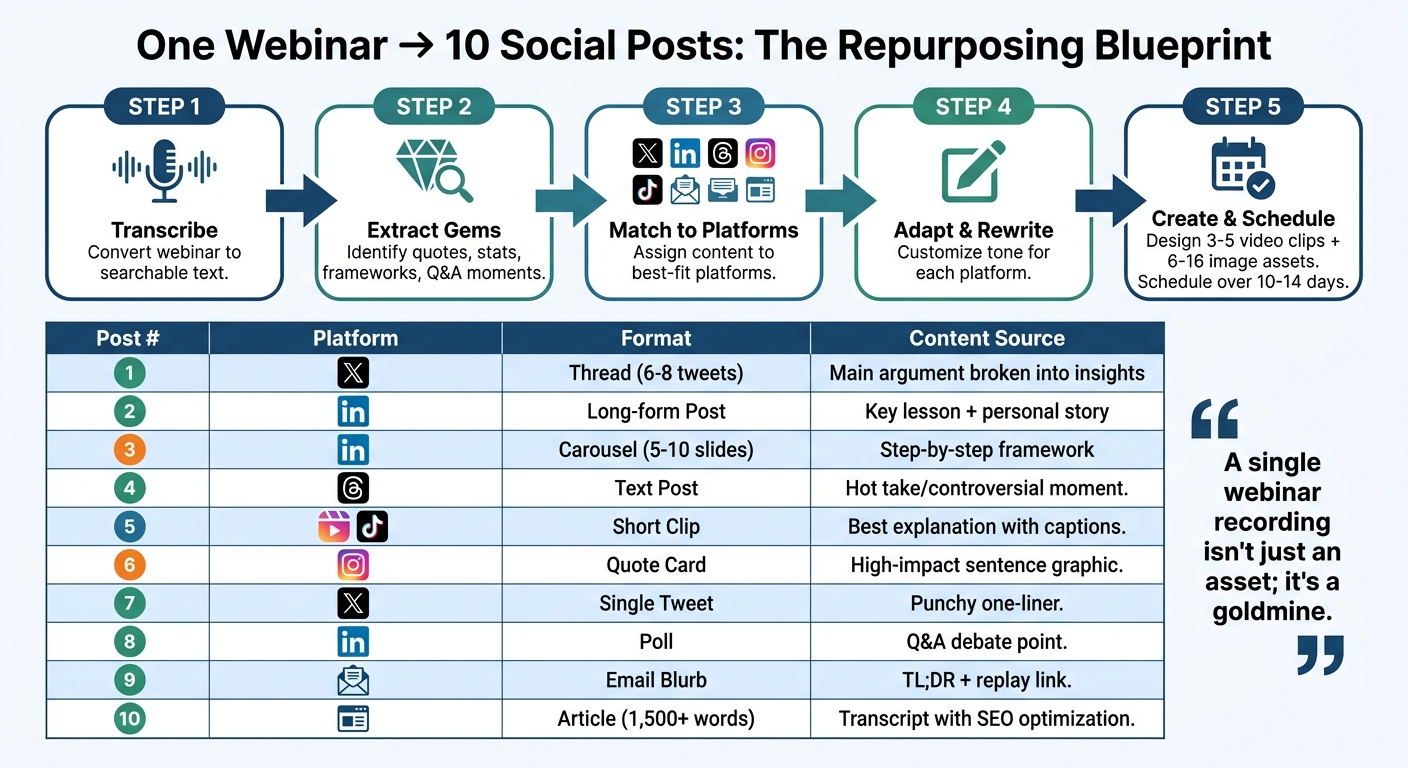
How to Turn One Content Asset Into 10 Platform-Specific Social Media Posts
The Repurposing Process Step-by-Step
Picture this: you’ve just wrapped up a killer content marketing webinar. Now, instead of letting it sit idle, you’re about to squeeze ten unique social posts out of it. Let’s break it down.
Start with transcription. First, transcribe the webinar to create a searchable text version. This becomes your goldmine for pulling out key takeaways - those nuggets of wisdom that’ll fuel all your repurposed posts.
Next, identify the gems. Look for standout quotes, compelling stats, actionable steps, or even audience questions from the webinar. These are your building blocks for crafting posts that pack a punch.
Match content to platforms. Not every insight belongs everywhere. Turn a detailed framework into a LinkedIn carousel, spin a sharp one-liner into a tweet, and clip a concise explanation for TikTok or Reels. The goal? Make sure each idea shines on the platform where it fits best.
Adapt for each platform’s vibe. Rewrite the content to match the tone of each platform. Keep it short and snappy for X (formerly Twitter), professional and story-driven for LinkedIn, and casual for Threads. Don’t forget to lead with a strong hook - grab attention right out of the gate.
Create visuals and plan your rollout. Use AI tools to whip up 3–5 short video clips (under 90 seconds each) and design 6–16 image-based assets like quote cards or carousels. Then, schedule these posts over 10–14 days to keep your audience engaged without overwhelming them.
"A single webinar recording isn't just an asset; it's a goldmine. The real challenge isn't creating more content; it's efficiently unlocking the value you already have." – RepurposeMyWebinar
Webinar to 10 Assets: A Mapping Table
Here’s how one webinar can morph into ten tailored posts across platforms:
| Post # | Platform | Format | Content Source |
|---|---|---|---|
| 1 | X (Twitter) | Thread (6–8 tweets) | Main webinar argument broken into numbered insights |
| 2 | Long-form Post | One key lesson framed with a personal story | |
| 3 | Carousel (5–10 slides) | Step-by-step framework or process | |
| 4 | Threads | Text Post | A "hot take" or controversial moment |
| 5 | Reels/TikTok | Short-form Clip | Best explanation clip with automatic subtitles |
| 6 | Quote Card | Single high-impact sentence as a branded graphic | |
| 7 | X (Twitter) | Single Tweet | A punchy one-liner or bold claim |
| 8 | Poll | A debate point or question from the live Q&A | |
| 9 | Newsletter | Email Blurb | TL;DR summary with a link to the replay |
| 10 | Blog/Website | Article (1,500+ words) | Cleaned-up transcript with subheadings and SEO optimization |
Pro tip: Don’t sleep on the Q&A section of your webinar - it’s a goldmine. Every question asked by your audience can be turned into an FAQ-style post. And if you’re feeling overwhelmed by the tools needed to pull this off, platforms like TopSocialTools can help you find exactly what you need, from auto-captioning to carousel creation, all in one place.
Now, keep that same energy and consistency flowing through every post you create.
Quality Control for Repurposed Content
Repurposing content isn’t just about reusing old ideas - it’s about ensuring every piece feels fresh, on-brand, and delivers results that matter. That’s where quality control steps in, acting as the glue between your workflows and your brand’s measurable success.
Maintaining Brand Consistency Across Platforms
Your audience should recognize your brand instantly, whether they’re scrolling LinkedIn or swiping through TikTok. This starts with nailing down your visual identity. Standardize everything - colors, fonts, logos, even that quirky mascot you love. Tools like Canva or ContentStudio are lifesavers here, offering brand kits that automatically apply your design rules to every piece of content.
But visuals are just one piece of the puzzle. Your tone of voice also needs to stay unmistakably yours. Sure, you might sound professional on LinkedIn and more laid-back on TikTok, but the core personality of your brand should shine through. Reuse your campaign hashtags, core mottos, and brand values to build trust and familiarity. And remember, one size doesn’t fit all - what works on LinkedIn might need a complete rewrite for Threads.
AI tools can help streamline the process, but don’t just hit “publish” on an AI draft. Spend a minute tweaking it to add your unique voice, insights, and that extra human touch. Finally, space out your repurposed content over a few weeks to avoid overwhelming followers who might see you on multiple platforms.
When your content consistently reflects your brand, the next step is ensuring it performs where it counts.
Measuring Performance of Repurposed Posts
Quality control isn’t just about how your content looks or sounds - it’s about making sure it delivers results. Tracking the performance of repurposed posts helps you understand what’s working and what’s not.
Start by analyzing performance by format, not just topic. For example, a LinkedIn carousel might crush it on that platform but flop as a tweet. Match your metrics to your goals: track reach and impressions for awareness, saves and shares for engagement, and link clicks (using UTM parameters) when conversions are the goal.
Here’s why it matters: 94% of B2B marketers say repurposing boosts content ROI, and repurposed posts can generate up to three times more engagement than publishing on a single platform. Make it a habit to spend 15 minutes each week reviewing your top-performing posts by saves and comments. These are your golden nuggets - the ones worth recycling. And avoid repurposing underperforming content; doubling down on weak material only amplifies the problem.
| Post Goal | Primary Metrics to Track | Purpose |
|---|---|---|
| Awareness | Reach, Impressions, Video Views | Gauge how many new people saw your content |
| Engagement | Saves, Shares, Comments, Replies | Measure how well the content resonated |
| Conversion | Link Clicks (UTM tracked), DMs, Leads | Track specific business actions |
| Efficiency | Content Output Volume, Production Time | Assess the ROI of your workflow |
Bottom line? Repurpose smarter, not harder. Focus on high-performing “pillar” content and let the data guide your next move.
Conclusion
Work smarter, not harder - especially when it comes to content. Take one webinar and spin it into ten tailored posts to tackle the distribution gap that leaves over 90% of your audience untouched. Think about it: a LinkedIn post reaches just 2% of followers on average, and a tweet burns out in under 30 minutes. Without repurposing, even your sharpest ideas risk fading into the void before anyone notices.
That’s where TopSocialTools steps in, automating the grind. It breaks down your long-form content into bite-sized gems - like standout quotes, actionable frameworks, or key insights - and reshapes them for each platform’s vibe. No more hours spent tweaking posts manually. Instead, you’ll have platform-ready drafts in minutes, ready to roll out over the next 10–14 days for maximum exposure. The payoff? Real results you can measure.
Here’s the proof: 94% of B2B marketers say repurposing stretches content ROI, and spreading content across multiple platforms can amplify reach by 60% compared to sticking to just one.
The game plan is simple: start with one high-value asset - a 20-minute video, a blog post, or a webinar. Break it into ten pieces of content, tailor them to fit each platform, and spread them out over two weeks. That’s the 1-to-10 Framework in action - one idea, ten posts, and a whole lot more impact.